PO7-640 Linux Control Center

Linux fan, temperature, hwmon and RGB/LED control for the Predator Orion 7000 PO7-640 with IT8637E Super I/O and WMI support.
⚠️ EXPERIMENTAL — IN DEVELOPMENTThis is unofficial software for a single machine.
It writes directly to Super I/O registers of an undocumented chip. The register layout was determined by observation, not from a datasheet. It has been tested on exactly one computer.
Do not run this on hardware you cannot afford to have misbehave. Expect breaking changes. There is no warranty of any kind.
Not affiliated with, endorsed by, or supported by Acer Inc. Acer and Predator are trademarks of Acer Inc., used here only to identify the hardware.
Linux hardware control for the Acer Predator Orion 7000 (PO7-640): fan control, temperature monitoring, a standard hwmon interface, RGB/LED control, WMI tools and IT8637E Super I/O support. Independent of Acer's Windows software.
Why this exists
On this board the usual Linux tooling fails, for two entirely different reasons.
lm-sensors finds no fans. The board uses an ITE IT8637E Super I/O.
That chip appears in no driver table in the kernel — it87, nct6775 and
nct6683 all report -ENODEV. No public documentation exists for it.
Acer's Linux drivers target the laptops. Predator Helios and Nitro models
use the same WMI GUID but a completely different method mapping. What is
SetGamingLED on a laptop means SetGamingSysConfig here, and the laptop
methods for fan control (IDs 14 and 16) do not exist on this board at all. A
laptop-oriented module would send commands with the wrong meaning to the
BIOS SMM handler.
The IT8637E register layout was therefore determined by observation on the running machine.
Feature status
| Status | |
|---|---|
| Read fan speeds | ✅ three channels |
| Control fans | ✅ four channels, 0–100 % |
| Switch automatic / manual | ✅ |
| Read temperatures | ✅ four sensors |
| Fan groups | ✅ user-defined |
| Standard hwmon interface | ✅ works with sensors, fancontrol |
| Switch chassis LEDs off/on | ✅ six zones, WMI method 5 |
| Read and set LED colour | ✅ six zones, WMI methods 7/8 |
| Select LED firmware effects | |
| Graphical front end | ✅ Qt 6, zones and fans |
| Saved profile, backup, restore | ✅ reapplied at boot via systemd |
Screenshots
| Lighting | Fans |
|---|---|
 |
 |
Tested hardware
Everything here has been tested on exactly one machine:
| Board | BIOS | Date |
|---|---|---|
| Predator PO7-640 | R01-B0 | 03/28/2023 |
Other PO7-640 units, other BIOS releases, or closely related Predator Orion desktops may behave differently: a register or WMI method that moved would be written blind.
Contributions for further systems of this type are very welcome. If you
own a PO7-640 with a different BIOS, or a related Orion model, reports and
pull requests help a lot. Useful details are the output of
cat /sys/class/dmi/id/{board_vendor,board_name,bios_version,bios_date},
sudo research/superio/sioid (build it with make -C research/superio), and
whether po7ctl status and the LED commands work as described. Please start
with the read-only tools; writing tools can misbehave on untested hardware.
Never post serial numbers, full dmidecode output, firmware or BIOS dumps.
SECURITY.md lists what to keep private and how to report
security issues.
How to contribute is in CONTRIBUTING.md, open questions
and plans in ROADMAP.md, and changes per release in
CHANGELOG.md.
Requirements
- Acer Predator Orion PO7-640 (no other model has been tested)
- Kernel headers and DKMS:
sudo apt install dkms linux-headers-$(uname -r) build-essential(DKMS is what rebuilds the module after a kernel update; without it, seemake install-staticbelow) - With Secure Boot on, the modules have to be signed: see
SECURE_BOOT.md - For the GUI only:
cmake,qt6-base-dev
Both modules check the DMI board identification and the Super I/O chip ID
before touching anything: the chip alone is not an identification, since
another vendor can wire the same IT8637E differently, and Predator laptops
expose the same WMI GUID with a different method mapping. On any other board
they refuse to load. ignore_dmi=1 overrides that, and is dangerous.
Installation
Package (Ubuntu 24.04+, Linux Mint 22+, Debian 13+)
Download the .deb from the latest release
and install it:
sudo apt install ./po7-640-control-center_*_amd64.deb
sudo modprobe predator_orion && sudo modprobe po7probe
The package registers both modules with DKMS, so they are rebuilt after every
kernel update, and loads them at boot. It contains po7ctl, the GUI and the
systemd units. For Arch Linux there is a PKGBUILD in packaging/arch/.
From source
make                      # build kernel module and CLI
sudo make install         # register with DKMS and install po7ctl
sudo modprobe predator_orion
po7ctl status
make install hands the module to DKMS, which keeps the sources in
/usr/src/predator-orion-0.1.0 and rebuilds it for every kernel that gets
installed afterwards. A kernel update therefore no longer leaves the machine
without fan control, and nothing has to be repeated by hand. It also builds the
module for every kernel already installed, not just the running one.
make status-dkms shows what DKMS currently holds.
On a machine without DKMS, sudo make install-static copies a module built
here into the running kernel's directory instead. That one has to be redone
after every kernel update: make && sudo make install-static.
To try it without installing anything:
sudo make loadsudo make uninstall removes both variants again.
The graphical front end is optional and built separately, so the module and the CLI compile without Qt. To run it straight from the source tree, without installing anything:
./gui.sh                  # builds on first run, then starts
./gui.sh --load-probe     # also loads the WMI probe, enabling LED control
To install it system-wide instead:
make gui                  # needs cmake and qt6-base-dev
sudo make install-gui
po7cc-launcher            # or start it from the desktop menu
The graphical front end
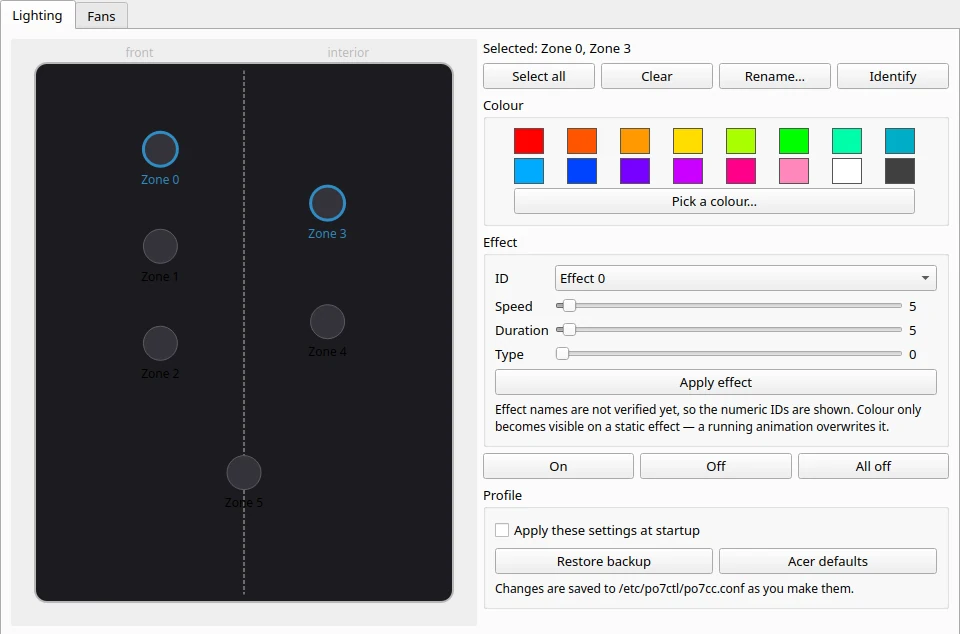
po7cc shows the six lighting areas as clickable dots on a chassis schematic.
Click one or several, then pick a colour from the palette or the colour dialog;
effects, on/off, and the four fan channels with their temperatures are in the
same window.
Because the physical position of each area is not established yet, the dots carry editable labels — double-click one, or use Rename… — and an Identify button blinks a single zone white. Rename it once you see which part of the case lit up.
Everything you set is written to /etc/po7ctl/po7cc.conf as you go: zone
names, colours, effects, and the fan setpoints. On the very first run the
state found on the machine is saved to /etc/po7ctl/backup.conf and left
alone, so Restore backup always leads back to how the machine behaved
before. Acer defaults goes to the shipped profile instead: effect 1 on
area 0, static elsewhere, all 00AEC7, fans back to the firmware.
The fan sliders are setpoints, not readings. The firmware constantly walks the PWM back towards its own target, so the live value is shown in its own column and the handle stays where you put it.
Fan setpoints do not survive the driver unloading. Tick Apply these settings at startup and enable the unit to get them back at boot:
sudo systemctl enable po7cc-restore.serviceThat runs po7cc --restore, which applies the saved profile without a GUI.
Writing needs root, so po7cc-launcher starts the program through pkexec.
Started as an ordinary user it still comes up, read-only, and says why. LED
control additionally needs the probe module with its separate write gate:
sudo make -C research/probe load-rw.
Usage
po7ctl status                       speeds, PWM, temperatures, groups
po7ctl fan <selector> <percent>     set a fixed speed
po7ctl fan <selector> auto          hand control back to the firmware

po7cc --led-off                       switch all chassis LEDs off once

sudo research/led/po7-led.sh off   switch all chassis LEDs off
sudo research/led/po7-led.sh on    restore Acer's default lighting
sudo research/led/po7-led.sh color 00aec7

po7ctl group add fan <name> <ids>   define a group
po7ctl group rm <name>              delete a group
po7ctl group list                   list groups
Selectors: all, 2, 2,3, @groupname
Example
po7ctl group add fan case 2,3   # combine channels 2 and 3
po7ctl fan @case 55             # both to 55 %
po7ctl fan 4 70                 # single channel
po7ctl fan all auto             # everything back to firmware control
Groups live in /etc/po7ctl/groups.conf and survive reboots.
Values below 20 % require --force, so cooling is not throttled by accident.
Channel assignment
| Channel | Observed |
|---|---|
| 1 | permanently 100 %, no trustworthy speed reading |
| 2 | case fan, ~2700 rpm |
| 3 | case fan, ~1950 rpm |
| 4 | regulates on its own, probably the AIO pump |
Channel 1 reports a tach count that would work out to over 18000 rpm under the chip's formula. The value is unexplained, so the driver exports no speed for that channel rather than a wrong one. Its PWM control works independently of this.
How this interacts with the firmware
The firmware regulates the fans itself and walks an externally written PWM value back towards its own target at about four units per second. In manual mode the driver therefore rewrites the value every 250 ms.
This is deliberate, not a workaround. If the driver dies, is unloaded or the system hangs, the firmware resumes control within seconds and thermal protection stays intact. A hard-disabled automatic mode would freeze the last value even with a hot CPU.
LED lighting
The chassis animation can be stopped. The earlier negative result came from
packing SetGamingLedBehavior incorrectly: the area mask belongs in the low
16 bits of the first u64; the second u16 is zero. off was confirmed
visually on the target PO7-640.
sudo make -C research/probe load-rw
sudo research/led/po7-led.sh off
sudo research/led/po7-led.sh on
sudo research/led/po7-led.sh color ff8000 0
sudo research/led/po7-led.sh status
To keep the writable LED interface available after reboot and kernel updates, install the probe through DKMS once:
sudo make -C research/probe install-rwThis installs po7probe with sweep=0 allow_write=1 led_only=1 and loads it
automatically at boot. The installed mode accepts only the known gaming LED
methods with their expected input lengths; research calls to other firmware
interfaces require an explicit manual load.
To switch the chassis lighting off automatically on every boot after installing the GUI, also enable the dedicated service:
sudo systemctl enable --now po7cc-led-off.serviceThe service runs po7cc --led-off after the kernel modules are loaded.
To remove the automatic probe installation, run
sudo make -C research/probe uninstall-rw.
po7-led.sh validates zones, colours, byte ranges, supported effect IDs, and
has --dry-run for inspecting payloads without hardware access.
Project layout
kernel/     predator_orion.c   hwmon driver for the IT8637E
tools/      po7ctl.c           CLI with groups and selectors
gui/        src/               Qt 6 front end (po7cc)
gui.sh                         build and start the GUI from the source tree
research/   probe/             WMI exploration as a kernel module
            superio/           EC tools
            led/               LED mapping
Research tools
Everything under research/ is analysis scaffolding, not installed by
make install. All read-only except where noted:
| Tool | Purpose |
|---|---|
superio/sioid |
identify Super I/O family and chip ID |
superio/ecdump |
full EC register dump |
superio/fanhunt.sh |
idle-versus-load comparison with noise filtering |
superio/ecmon |
live monitor for speed, PWM, temperature |
superio/ecwatch.sh |
find registers that change over time |
superio/pwmtest |
writes — guarded single test, increases only |
superio/ledec |
writes — EC test for the lighting |
probe/ |
WMI sweep and interactive calls through debugfs |
led/ledmap.sh |
read-back check of which LED fields are real |
led/po7-led.sh |
validated six-zone LED control (writes) |
led/test-po7-led.sh |
hardware-free payload packing tests |
The writing tools save the original state and restore it unconditionally,
including on Ctrl-C and SIGTERM. They also refuse to run unless the
expected chip is present, so they cannot poke arbitrary ports on other
hardware.
The probe module exposes arbitrary WMI method invocation through debugfs
and is a research instrument only. Write access requires loading it with
allow_write=1.
Licence
Copyright (C) 2026 arn-c0de arn-c0de@protonmail.com
GPL-2.0-or-later. The full licence text is in LICENSE, and every
source file carries an SPDX-License-Identifier: GPL-2.0-or-later tag together
with the copyright line above, which is the authoritative statement for that
file. Licensing questions go to arn-c0de@protonmail.com.